Current Opportunities: Difference between revisions
Jump to navigation
Jump to search
(Created page with "Category: CurrentRMS This is the screen where all the opportunities are listed. The view pull down allows you to change the opportunities displayed by having different f...") |
mNo edit summary |
||
| (One intermediate revision by the same user not shown) | |||
| Line 9: | Line 9: | ||
* Equipment Out - Active Rentals | * Equipment Out - Active Rentals | ||
IMPORTANT: | IMPORTANT: The Contract, Paid and CCA (Credit Card Authorization) Fields have to be set to YES before we release equipment. | ||
[[File:CurrentRMS-Opportunities-Screen.png|800px|none|center|Current Opportunities Screen]] | |||
[[File:CurrentRMS-Opportunities-Screen.png| | |||
* State: Quotation or Order | * State: Quotation or Order | ||
Latest revision as of 05:24, 30 October 2019
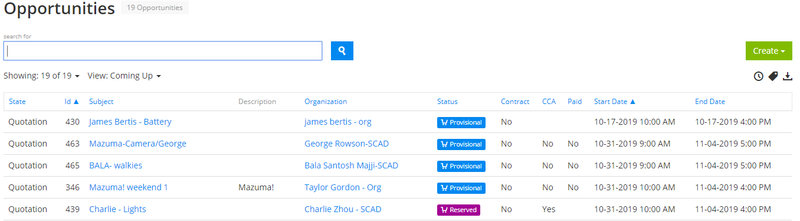
This is the screen where all the opportunities are listed.
The view pull down allows you to change the opportunities displayed by having different filters. The most common views we use are:
- Current (default) - Active and Upcoming Rentals
- Coming Up - Upcoming Rentals Only
- Equipment Out - Active Rentals
IMPORTANT: The Contract, Paid and CCA (Credit Card Authorization) Fields have to be set to YES before we release equipment.

- State: Quotation or Order
- Id: Opportunity Id
- Subect: TItle of Opportunity
- Description: Name of Project
- Organization: Client Renting
- Status: Provisional / Reserved / Open / Active
- Contract: Signed Contract Filled Out
- CCA: Credit Card Authorization Filled Out
- Paid: Order Paid
- Start Date: Pick-up Date
- End Date: Return Date